Federal Reserve Economic Data

The FRED® Blog

Teenagers’ labor force participation

BLS data on the evolution of summer jobs

The FRED Blog has compared employment among teenagers with employment among older workers: Teens no longer participate in the labor market with the same vigor as they did up to 1978. That post also showed how teen employment is clearly seasonal, spiking during the summer when school’s out.

The FRED graph above plots the monthly, not seasonally adjusted labor force participation rate of those 16 to 19 years old (purple spikes) along with the annual, seasonally adjusted value (black dashed line). Clearly, the seasonal swings are extreme and the overall trend has changed over time.

Between 1948 and the 1978 peak, on average, 62% of teens were either employed or looking for a job during the summer months of June, July, and August. The rest of the year, their labor force participation rate ranged between 44% and 48%. Since then, both the seasonal spikes and dips gradually decreased. And, as of 2019, the summertime teen labor force participation rate was down to 41% and the off-season rate was down to 33%. (Of course, the regularity was wrecked by the COVID-19 pandemic.)

So, what’s changed with kids today? Maybe some of their music can help us understand the story…

  • In 1962, Brian Hyland’s “Summer Job” consisted of “taking care of the one I love” and “ice cream pops and groovy tans.”
  • In 2021, Chris Lane’s “Summer Job Money” also deals with a romantic infatuation, but the singer also laments the rising costs of a college education and laboring at a minimum-wage job to pay for it.

Structural changes in labor markets are at play here. As better-paid occupations have required more human capital, teens (and their parents) have devoted less of their time to earning a wage. Instead, they strive to advance their formal education. So, despite the claims of Alice Cooper’s “School’s Out,” school continues to occupy young people’s minds and time even in the summer.

How this graph was created: Search for and select “Labor Force Participation Rate – 16-19 Yrs., Monthly, Not Seasonally Adjusted.” From the  “Edit Graph” panel’s “Add Line” tab, search for and add “Labor Force Participation Rate – 16-19 Yrs., Monthly, Seasonally Adjusted.” Then edit Line 2 by changing the frequency to “Annual” and the colors of the lines in the “Format” panel.

Suggested by Diego Mendez-Carbajo.

A V-shaped recovery

Tracking GDP in the G-7 through COVID-19

The pandemic-driven recession started in the first quarter of 2020. After a  year, it appears the recession is nearly at an end. The FRED graph above tracks this downturn in GDP for countries in the G-7, all indexed to 100 in Q4 2019.

The full legend is large, so we’ve removed it from this graph. Simply mouse over the graph to read the series titles and identify the countries: solid red = U.S., purple dash-dots = Japan, green dots = Canada, orange dots = France,  green dashes = Germany,  solid gray = Italy, and blue dash-dots = U.K.  

GDP dropped sharply in all countries in Q2 2020. The worst-hit country was the U.K., where GDP dropped by more than 20%. The least-impacted country was Japan, with a drop of less than 10%.

GDP levels have been recovering; but as of Q1 2021, they’re all still below their Q4 2019 levels. U.S. GDP is only 1% below its Q4 2019 level, France’s and Germany’s are more than 4% down, and Italy’s is still 7% down. First-quarter data for Japan and the U.K. aren’t yet available, but as of Q4 2020, their GDPs were down 1% and 7%, respectively.

G-7 countries haven’t yet achieved a full V-shaped recovery from the COVID-19 recession, but keep watching this graph as it updates with new data.

How this graph was created: Search for and select one of the series. From the “Edit Graph” panel, use the “Add Line” tab to add the 6 other series. From the “Edit Lines” panel, select “Index (Scale value to 100 for chosen date)” in “Units.” Select 2019-10-01 as the date for the custom index and select “Copy to all.” In the “Format” panel, select line styles and colors as desired, set recession shading to “On,” and (if desired) deselect “Title” in the “Show” section. Using the blue sliding bar at the bottom of the graph, adjust the timespan to start in Q4 2019.

Suggested by Iris Arbogast and Yi Wen.

The distribution of patents across U.S. states

Tracking innovation for Californians, Massachusettsans, Idahoans, Mainers, etc. etc.

FRED Blog posts have discussed patent royalties, R&D, and the balance of payments and the changing geography of U.S. innovation. Today, we tap into a recently added data set from the U.S. Patent and Trademark Office to discuss the distribution of patented new ideas across U.S. states.

The GeoFRED map above shows the number of patents registered in each state during 2019, which is the latest available data point as of this writing. The total number of new patents for the whole country was 186,022, and the map illustrates their uneven geographical distribution. While California recorded 50,667 patents, Maine recorded 249. That might be expected simply because the population isn’t evenly distributed across the country: For each Mainer, there are 29 Californians. But it’s not all about population.

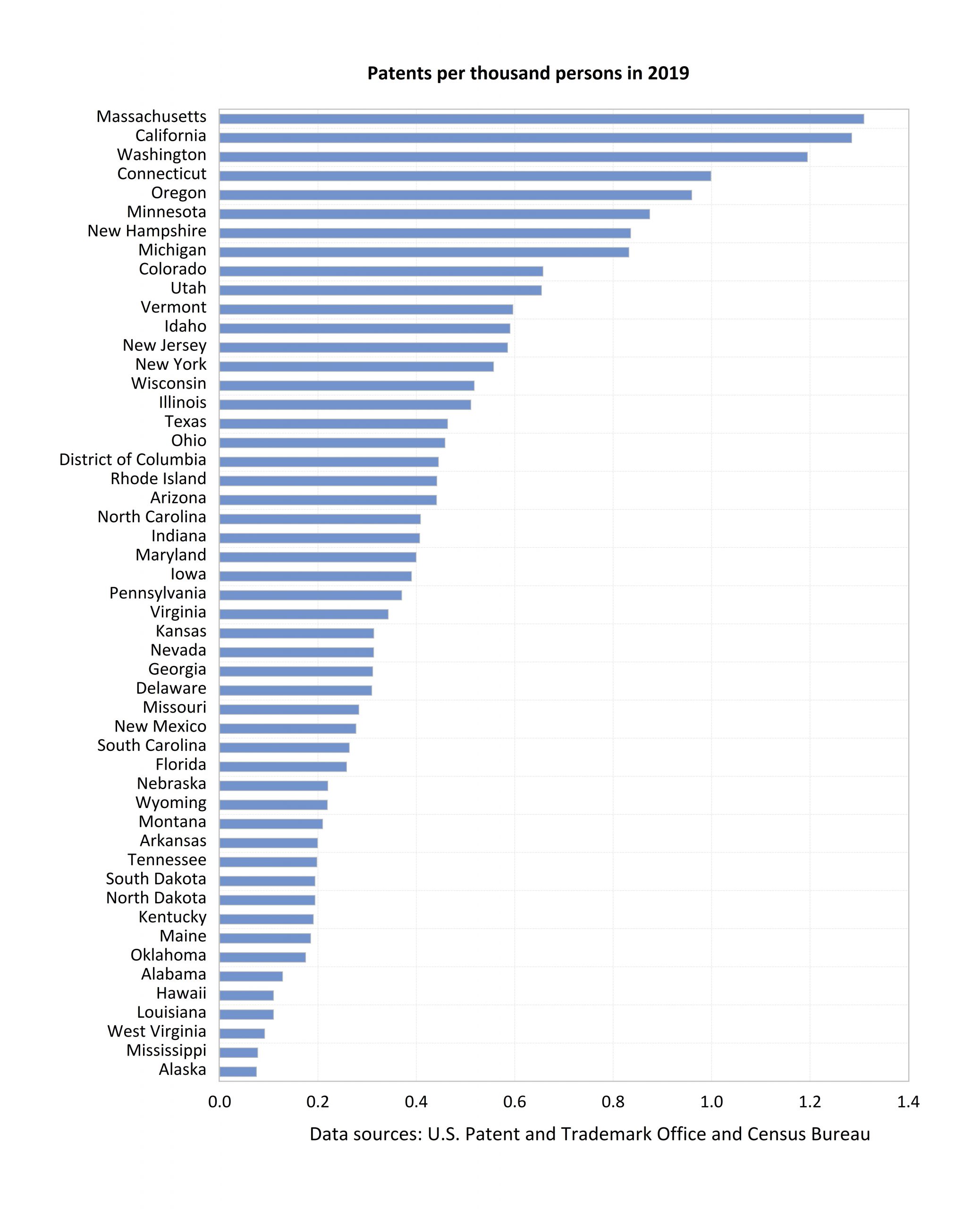
The second graph shows the number of patents divided by the number of persons (in thousands) residing in each state in 2019. At the top of the graph is Massachusetts, with 1.31 patents per 1,000 residents. California is a close second, despite the fact that there are almost 8 Californians for each Massachusettsan.

Let’s take another example: West Virginia and Idaho are the two most similar states in terms of population size, yet Idahoans record 6.4 times more patents than West Virginians.

Factors like the presence of large cities, institutions of higher education, particular industries, and research centers help explain the disparities in the numbers of patents per person.

How this map was created: The original post referenced an interactive map from our now discontinued GeoFRED site. The revised post provides a replacement map from FRED’s new mapping tool. To create FRED maps, go to the data series page in question and look for the green “VIEW MAP” button at the top right of the graph. See this post for instructions to edit a FRED map. Only series with a green map button can be mapped.

Suggested by Diego Mendez-Carbajo.


Back to Top