Federal Reserve Economic Data

The FRED® Blog

Unemployment by occupation

The new FRED release tables make it much easier to find related series. One example is Table A-13 in the BLS’s household data release, which describes the employment situation by occupation. The graph here shows the unemployment rate in some occupations: Clearly, any occupation linked to producing stuff or moving it has 1) a higher unemployment rate and 2) substantial seasonal fluctuations. Also, even in the best times (booms in the summer) these occupations maintain a higher unemployment rate than others. Why is that? A similar graphical ladder exists for unemployment rates by educational attainment (discussed in a previous post on this blog), and similar factors may be at work behind this graph.

How this graph was created: Go to release Table A-13, select the relevant series, and click on the “add to graph” button.

Suggested by Christian Zimmermann

View on FRED, series used in this post: LNU04032215, LNU04032219, LNU04032222, LNU04032226

Graphing GDP components with our new release view

FRED makes it easy to create a stacked area graph of GDP components using our new release view feature:

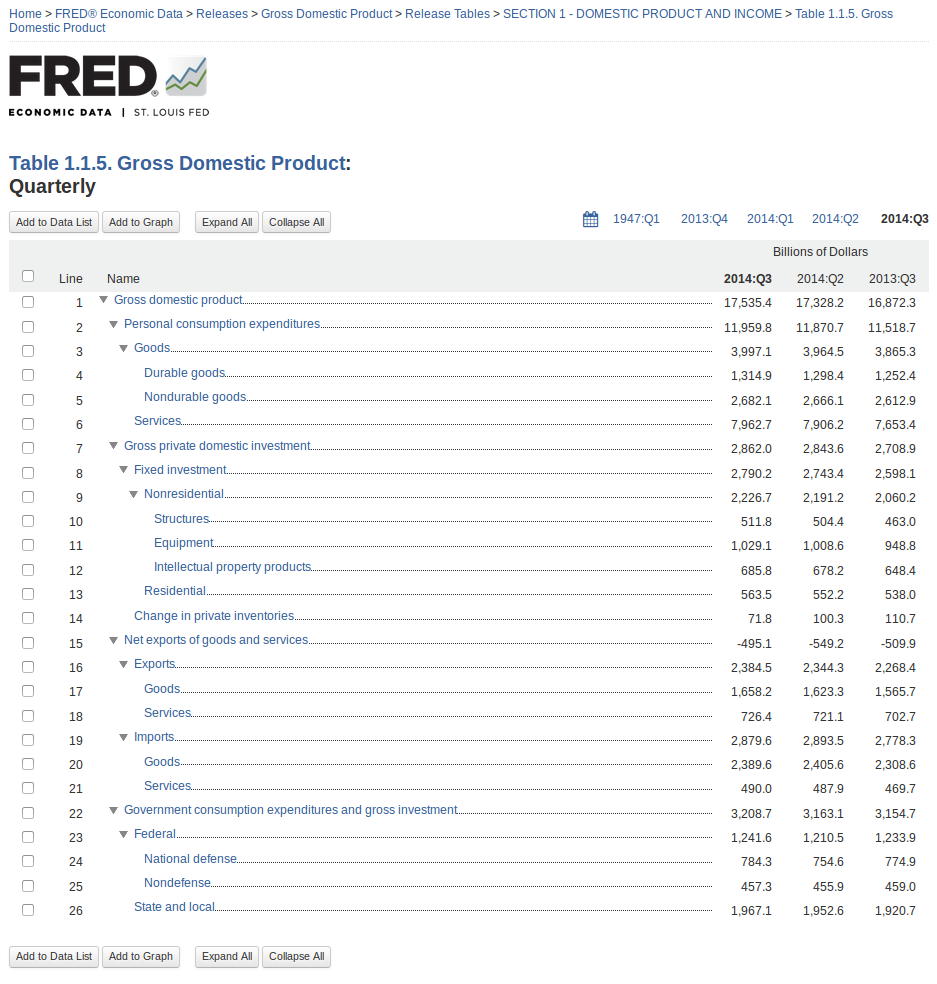
How this graph was created: Navigate to the gross domestic product release page using the “Releases” link on the FRED homepage. Choose “Gross Domestic Product” (page 2) and then click on the “Section 1 – Domestic Product and Income” release link. Select Table 1.1.5 and then select the “Quarterly” series (they’re all quarterly). Now you have reached the components of GDP, and the page will look like this:

Screenshot from 2014-11-20 15:13:17

From here, you can easily see the components of GDP as a hierarchy with the latest value, the previous period’s value, and the value from a year ago. Check the boxes next to personal consumption expenditures, gross private domestic investment, net exports of goods and services, and government consumption expenditures and gross investment. Then click the “Add to Graph” button.

You’ll see a line graph of the four series. Under the graph tab, expand the “Graph Settings” menu. Change the graph type to “Area” and the stacking to “Normal.” Finally, so that net exports are easier to see, expand the menu for that series and click the “move down” button.

Suggested by Keith Taylor

View on FRED, series used in this post: GCE, GPDI, NETEXP, PCEC

Measuring labor costs

Some economic analysts are looking for signs of faster wage growth (labor costs). In their view, faster wage growth is a sign of building inflation pressures. In October’s employment report (released Nov. 7), average hourly earnings of production and nonsupervisory employees on private nonfarm payrolls rose by only 2.2 percent over the past 12 months. A rather modest increase. Although closely followed, this series excludes most employee benefits, such as employer-paid health insurance and retirement benefits.

Broader measures that better account for these benefits include the employment cost index (ECI) and compensation per hour (CPH) in the business sector, both published by the Bureau of Labor Statistics. In the third quarter of 2014, the ECI increased by 2.3 percent over the past four quarters, while the CPH increased by 3.1 percent. But these two series are also incomplete: The reason is that businesses tend to care more about unit costs: that is, costs of labor and non-labor inputs adjusted for productivity changes. For example, if compensation is increasing solely because of faster gains in worker productivity, then unit labor costs will be unchanged and a firm’s profit margins will be largely unaffected. This can be seen in the graph. After the past recession, compensation per hour was increasing, but because labor productivity was increasing by a larger amount, unit labor costs were falling.

In the productivity and costs report released earlier this month, the Bureau of Labor Statistics reported that unit labor costs in the business sector had increased by 2.4 percent in the third quarter from a year earlier. The modest acceleration in unit labor costs over the past three quarters reflects, on net, slower growth in labor productivity and slightly faster growth in compensation per hour.

How this graph was created: Search for “Nonfarm Business Sector: Unit Labor Cost.” In the “Edit Data Series” function, change the units to “Percent Change from a Year Ago.” Repeat the process by adding these series: “Nonfarm Business Sector: Compensation Per Hour” and “Business Sector: Real Output Per Hour of All Persons” (labor productivity).

Suggested by Kevin Kliesen

View on FRED, series used in this post: HCOMPBS, OPHPBS, ULCBS


Back to Top